Use an existing TV
Open the private home-screen link in a TV browser, or connect a small PC by HDMI. A QR pairing code helps family connect the screen without typing a long address.
For families coordinating an older adult’s care at home: keep appointments, rides, routines, household tasks, and caregiver visits together. Invite the organization and the specific caregivers you trust, so everyone can follow the same plan.
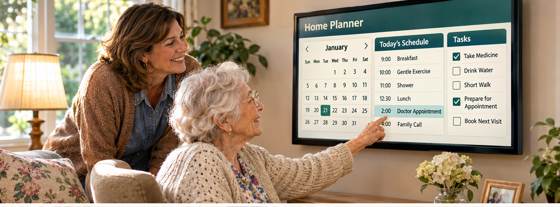
Concept image: a 24-inch touchscreen planner in a private home, with family support nearby.
Parents can add basic appointments, reminders, notes, calls, and groceries. Adult children use the detailed dashboard; caregivers can use quick QR forms for groceries, medication, bills, and visit updates.
Open the private home-screen link in a TV browser, or connect a small PC by HDMI. A QR pairing code helps family connect the screen without typing a long address.
A compatible touch overlay can make a regular TV touch-enabled when connected to the computer by USB. A wireless keyboard, mouse, webcam, or microphone can be added when useful.
Install the parent display from the browser for a desktop icon, or configure a Windows kiosk account to reopen it automatically after a restart.
Families may be juggling appointments, rides, meals, medication reminders, bills, home routines, and caregiver visits—often across texts, paper notes, calendars, and phone calls.
Important dates and everyday tasks are easy to lose track of when they are spread across notes and messages.
Visit instructions and household priorities should be clear to the people the family has invited.
Updates can get missed when each person has a different version of the plan.
Everyday Parent Planner brings the household’s ongoing care coordination together. The family chooses what to organize, who to invite, and which caregivers can see each home’s plan.
Keep upcoming visits, transportation, and related notes together.
Track the household reminders that matter to this family.
Coordinate scheduled visits, check-ins, and agreed visit checklists.
Leave useful follow-up in the same home plan, so the family can see what happened.
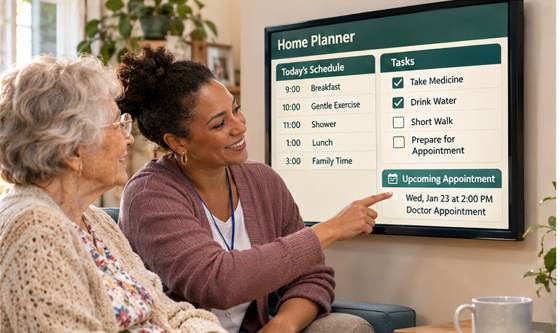
The family home plan is the center of the product. Caregiver organization access is added by invitation and permission.
The organization connects to the family’s existing home plan. Caregivers work from assigned visits and household instructions; the family stays responsible for the broader plan and decides who has access.
Use the 24-inch touch display to keep the calendar, today’s plan, and household tasks easy to find at home.
Review the household’s agreed checklist and upcoming appointments together on the home display.
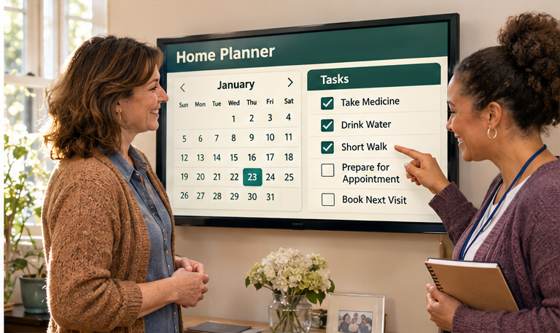
Use the family’s home plan for visit handoff, follow-up, and next steps.
Concept images show the 24-inch home touchscreen as the shared point for the family calendar, daily plan, and caregiver visit updates.
Caregivers use the family’s home plan to prepare for an assigned visit, follow the agreed checklist, and leave a clear update for the household.
The family shares the home plan with the organization and specific caregivers they choose.
Caregivers review the visit time, household notes, and agreed checklist.
The 24-inch display keeps the household calendar and daily plan visible at home.
Caregivers record agreed follow-up so the family can see what happened and what comes next.
The family invites caregiver organization members, assigns visits, and keeps household coordination in one place. Caregivers see the visit information needed to do their work and leave updates for the family.
Access boundaries and staff workflows should be confirmed with pilot families and the partner organization before wider rollout.
For an older adult who wants to remain at home, with family helping organize appointments, rides, routines, and caregiver visits.
For a small caregiver team ready to coordinate scheduled visits, household instructions, checklists, and family updates.
Each household chooses which tools to use. Some need a calendar and visit notes; others use more of the home-care workflow.
Pilot the shared home plan with families coordinating similar at-home care needs and the caregivers who support them.
Invite a few families and caregivers whose routines include appointments, rides, home tasks, and regular visits.
Agree who invites caregivers, what information is shared, and what caregivers should update after visits.
Use the home plan for schedules, visit checklists, and family updates during the pilot.
Ask families and caregivers what helped, what felt confusing, and what needs to change.
Offer a no-cost, small-group pilot to help families and caregivers stay aligned around visits and everyday follow-up. Review the workflow together, simplify what gets in the way, then decide whether an organization-branded version is worth expanding.